Delay Loops
There is one slight drawback to our flashing LED program. Each instruction takes one clock cycle to complete. If we are using a 4MHz crystal, then each instruction will take 1/4MHz, or 1uS to complete. As we are using only 5 instructions, the LED will turn on then off in 5uS. This is far too fast for us to see, and it will appear that the LED is permanently on. What we need to do is cause a delay between turning the LED on and turning the LED off.
The principle of the delay is that we count down from a previously set number, and when it reaches zero, we stop counting. The zero value indicates the end of the delay, and we continue on our way through the program.
So, the first thing we need to do is to define a constant to use as our counter. We will call this constant COUNT. Next, we need to decide how big a number to start counting from. Well, the largest number we can have is 255, or FFh in hex. Now, as we mentioned in the last tutorial, the equ
instruction assigns a word to a register location. This means that
whatever number we assign our COUNT, it will equal the contents of a register.
If we try and assign the value FFh, we will get an error when we come to compile the program. This is because location FFh is reserved, and so we can’t access it. So, how do we assign an actual number? Well, it takes a little bit of lateral thinking. If we assign our COUNT to the address 08h, for example, this will point to a general purpose register location. By default, the unused locations are set to FFh. Therefore, if COUNT points to 08h, it will have the value of FFh
when we first switch on.
But, We hear you cry, how do we set COUNT to a different number? Well, all we do is ‘move’ a value to this location first. For example, if we wanted COUNT to have a value of 85h, we can’t say COUNT equ 85h because that is the location of out Tri-State register for Port A. What we do is this:
movlw 85h ;First put the value of 85h in the W register
movwf 08h ;Now move it to our 08h register.
Now, when we say COUNT equ 08h, COUNT will equal the value 85h. Subtle, isn’t it!
So, first we define our constant:
COUNT equ 08h
Next we need to decrease this COUNT by 1 until it reaches zero. It just so happens that there is a single instruction that will do this for us, with the aid of a ‘goto’ and a label. The instruction we will use is:
DECFSZ COUNT,1
This instruction says ‘Decrement the register (in this case COUNT) by the number that follows the comma. If we reach zero, jump two places forward.’ A lot of words, for a single instruction. Let us see it in action first, before we put it into our program.
COUNT equ 08h
LABEL decfsz COUNT,1
goto LABEL
Carry on here.
:
:
:
What we have done is first set up our constant COUNT to 255. The next line puts a label, called LABEL next to our decfsz instruction. The decfsz COUNT,1 decreases the value of COUNT by 1, and stores the result back into COUNT. It also checks to see if COUNT has a value of zero. If it doesn’t, it then causes the program to move to the next line. Here we have a ‘goto’ statement which sends us back to our decfsz instruction. If the value of COUNT does equal zero, then the decfsz
instruction causes our program to jump two places forward, and goes to where We
have said ‘Carry on here’. So, as you can see, we have caused the program
to stay in one place for a predetermined time before carrying on. This is
called a delay loop. If we need a larger delay, we can follow one loop by
another. The more loops, the longer the delay. We are going to need
at least two, if we want to see the LED flash.
Let us put these delay loops into our program, and finish off by making it a real program by adding comments:
;*****Set up the Constants****
STATUS equ 03h ;Address of the STATUS register
TRISA equ 85h ;Address of the tristate register for port A
PORTA equ 05h ;Address of Port A
COUNT1 equ 08h ;First counter for our delay loops
COUNT2 equ
09h
;Second counter for our delay loops
;****Set up the port****
bsf STATUS,5 ;Switch to Bank 1
movlw 00h ;Set the Port A pins
movwf TRISA ;to output.
bcf
STATUS,5 ;Switch back to Bank 0
;****Turn the LED on****
Start movlw 02h ;Turn the LED on by first putting
movwf PORTA ;it into the w register and then ;on
the port
;****Start of the delay loop 1****
Loop1 decfsz COUNT1,1 ;Subtract 1 from 255
goto Loop1 ;If COUNT is zero, carry on.
decfsz COUNT2,1 ;Subtract 1 from 255
goto Loop1 ;Go back to the start of our loop. ;This delay counts down from ;255 to zero, 255 times
;****Delay finished, now turn the LED off****
movlw 00h ;Turn the LED off by first putting
movwf PORTA ;it into the w register and then on ;the
port
;****Add another delay****
Loop2 decfsz COUNT1,1 ;This second loop keeps the
goto Loop2 ;LED turned off long enough for
decfsz COUNT2,1 ;us to see it turned off
goto Loop2 ;
;****Now go back to the start of the program
goto Start ;go back to Start and turn LED ;on
again
;****End of the program****
end ;Needed by some compilers,
;and also just in case we miss ;the goto instruction.
You can compile this program and then program the PIC. Of course, you will want to try the circuit out to see if it really does work. Here is a circuit diagram for you to build once you have programmed your PIC.
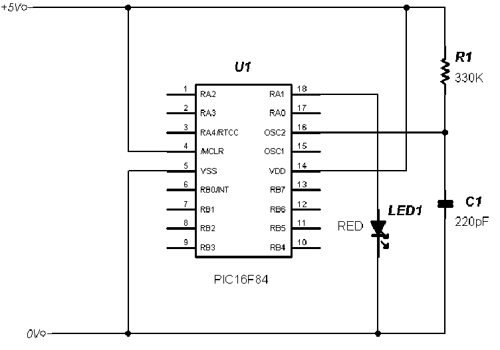
Congratulations, you have just written your first PIC program, and built a circuit to flash an LED on and off. So far, if you have followed these tutorials, you have learnt a total of 7 instruction out of 35, and yet already you are controlling the I/O ports!
Why not try and alter the delay loops to make the LED flash faster – what is the minimum value of COUNT to actually see the LED flash? Or, why not add a third or even more delay loops after the first one to slow the LED down. You will need a different constant for each delay loop. You could then even adjust your delay loops to make the LED flash at a given rate, for example once a second.
In the next tutorial we will see how we can use a thing called a subroutine to help keep the program small and simple.
Click here >>>> Tutorial 5 |