The Registers
A register is a place inside the PIC that can be written to, read from or both. Think of a register as a piece of paper where you can look at and write information on.
The figure below shows the register file map inside the PIC16F84. Don’t worry if you haven’t come across anything like this before, it is only to show where the different bits and pieces are inside the PIC, and will help explain a few of the commands.
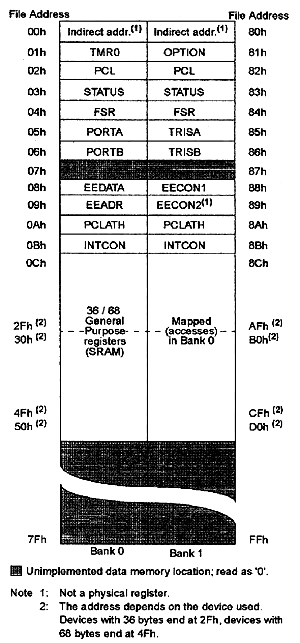
First thing you will notice is that it is split into two - Bank 0 and Bank 1. Bank 1 is used to control the actual operation of the PIC, for example to tell the PIC which bits of Port A are input and which are output. Bank 0 is used to manipulate the data. An example is as follows: Let us say we want to make one bit on Port A high. First we need to go to Bank 1 to set the particular bit, or pin, on Port A as an output. We then come back to Bank 0 and send a logic 1 (bit 1) to that pin.
The most common registers in Bank 1 we are going to use are STATUS, TRISA and TRISB. The first allows us to come back to Bank 0, TRISA allows us to select which pins on Port A are output and which are input, TRISB allows us to select which pins on Port B are output and which are input. The SELECT register in Bank 0 allows us to switch to Bank 1.
Let us take a closer look at these three registers.
STATUS
To change from Bank 0 to Bank 1 we tell the STATUS register. We do this by setting bit 5 of the STATUS register to 1. To switch back to Bank 0, we set bit 5 of the STATUS register to 0. The STATUS register is located at address 03h (the ‘h’ means the number is in Hexadecimal).
TRISA and TRISB.
These are located at addresses 85h and 86h respectively. To program a pin to be an output or an input, we simply send a 0 or a 1 to the relevant bit in the register. Now, this can either be done in binary, or hex. We personally use both, as the binary does help visualize the port. If you are not conversant with converting from binary to hex and vice versa, then use a scientific calculator.
So, on Port A we have 5 pins, and hence 5 bits. If We wanted to set one of the pins to input, We send a ‘1’ to the relevant bit. If We wanted to set one of the pins to an output, We set the relevant bit to ‘0’. The bits are arranges in exactly the same way as the pins, in other words bit 0 is RA0, bit 1 is RA1, bit 2 is RA2 and so on. Let’s take an example. If We wanted to set RA0, RA3 and RA4 as outputs, and RA1 and RA2 as inputs, We send this: 00110 (06h). Note that bit zero is on the right, as shown:
Port A Pin RA4 RA3 RA2 RA1 RA0
Bit Number 4 3 2 1 0
Binary 0 0 1 1 0
The same goes for TRISB.
PORTA and PORTB
To send one of our output pins high, we simply send a ‘1’ to the corresponding bit in our PORTA or PORTB register. The same format follows as for the TRISA and TRISB registers. To read if a pin is high or low on our port pins, we can perform a check to see if the particular corresponding bit is set to high (1) or set to low (0).
Before We give an example code, We need to explain just two more register – w and f.
W
The W register is a general register in which you can put any value that you wish. Once you have assigned a value to W, you can add it to another value, or move it. If you assign another value to W, its contents are overwritten.
An Example Code.
We are going to give you some example code on what we have just learnt. Don’t try and compile this yet, we will do that when we come to our first program. We are just trying to show how the above is actually programmed and introduce a couple of instructions along the way. We are going to set up Port A as per the example above.
First, we need to switch from Bank 0 to Bank 1. We do this by setting the STATUS register, which is at address 03h, bit 5 to 1.
BSF 03h,5
The BSF Means Bit Set F. The letter F means that we are going to use a memory location, or register. We are using two numbers after this instruction – 03h, which is the STATUS register address, and the number 5 which corresponds to the bit number. So, what we are saying is “Set bit 5 in address 03h to 1”.
We are now in Bank 1.
MOVLW b'00110'
We are putting the binary value 00110 (the letter b means the number is in binary) into our general purpose register W. We could of course have done this in hex, in which case our instruction would be:
MOVLW 06h
Either works. The MOVLW means ‘Move Literal Value Into W’, which in English means put the value that follows directly into the W register.
Now we need to put this value onto our TRISA register to set up the port:
MOVWF 85h
This instruction means “Move The Contents Of W Into The Register Address That Follows”, in this case the address points to TRISA.
Our TRISA register now has the value 00110, or shown graphically:
Port A Pin RA4 RA3 RA2 RA1 RA0
Binary 0 0 1 1 0
Input/Output O O I I O Now we have set up our Port A pins, we need to come back to Bank 0 to manipulate any data.
BCF 03h,5
This instruction does the opposite of BSF. It means “Bit Clear F”. The two numbers that follow are the address of the register, in this case the STATUS register, and the bit number, in this case bit 5. So what we have done now is set bit 5 on our STATUS register to 0.
We are now back in Bank 0.
Here is the code in a single block:
BSF 03h,5 ;Go to Bank 1
MOVLW 06h ;Put 00110 into W
MOVWF 85h ;Move 00110 onto TRISA
BCF 03h,5 ;Come back to Bank 0
Read this through a couple of times, until it is you can follow it. So far we have looked at 4 instructions. Only 31 to go!
Click here >>>> Tutorial 3
(Writing To the Ports)
|