The Watchdog Timer
We are now going to look at an internal timer, called a Watchdog Timer
So what is a Watchdog Timer?
Suppose you have written a program that is continuously running on a PIC. Now, you want to make sure that this program is always running, and that no matter what happens it will never stop. The first thing you would have, of course, is a loop back at the end of the program that brings us back to the start of the program. But consider this case. Let us say that the PIC is monitoring an input. When this input goes high, it jumps to another part of the program and waits for another pin to go high. If the second pin doesn’t go high, the PIC will just sit there and wait. It will only exit if the second pin goes high. Let us consider another example. Suppose you have written a program. You have compiled it successfully, and you have even simulated it over and over again using a simulator such as MPLAB. Everything seems to work fine. You program the PIC and place it into a circuit. However after a long period of time, the program gets stuck somewhere and the PIC gets caught in a loop. What’s needed in both cases is some kind of reset if the program gets stuck. This is the purpose of a watchdog circuit.
A watchdog circuit is nothing new. Many microprocessors and microcontrollers have them. But how does it work? Well, inside the PIC there is a resistor/capacitor network. This provides a unique clock, which is independent of any external clock that you provide in your circuit. Now, when the Watchdog Timer (abbreviated to WDT) is enabled, a counter starts at 00 and increments by 1 until it reaches FF. When it goes from FF to 00 (which is FF + 1) then the PIC will be reset, irrespective of what it is doing. The only way we can stop the WDT from resetting the PIC is to periodically reset the WDT back to 00 throughout our program. Now you can see that if our program does get stuck for some reason, then the WDT will not be set. The WDT will then reset the PIC, causing our program to restart from the beginning.
In order to use the WDT, we need to know three things. First, how long have we got before we need to reset the WDT, secondly how do we clear it. Finally, we have to tell the PIC programming software to enable the WDT inside the PIC. Let’s look at these separately.
WDT Times
The PIC data sheet specifies that the WDT has a period from start to finish of 18mS. This is dependant several factors, such as the supply voltage, temperature of the PIC etc. The reason for the approximation is because the WDT clock is supplied by an internal RC network. The time for an RC network to charge depends on the supply voltage. It also depends on the component values, which will change slightly depending on their temperature. So, for the sake of simplicity, just take it that the WDT will reset every 18mS. We can, however, make this longer. Inside the PIC is a thing called a Prescaler. We can program this prescaler to divide the RC clock. The
more we divide the RC clock by, the longer it takes for the WDT to reset.
The prescaler is located in the OPTION register at address 81h, bits 0 to 2 inclusive. Below is a table showing the bit assignments with the division rates and the time for the WDT to time out:
|
Bit 2,1,0 |
Rate |
WDT Time |
| 0,0,0 |
1:1 |
18mS |
| 0,0,1 |
1:2 |
36mS |
| 0,1,0 |
1:4 |
72mS |
| 0,1,1 |
1:8 |
144mS |
| 1,0,0 |
1:16 |
288mS |
| 1,0,1 |
1:32 |
576mS |
| 1,1,0 |
1:64 |
1.1Seconds |
| 1,1,1 |
1:128 |
2.3Seconds |
Remember these times are irrespective of your external clock frequency. Think of these times as real time, rather than clock times. To help make this clear, let us suppose we want the WDT to reset our PIC after about half a second as a failsafe. The nearest we have is 576mS, or 0.576 seconds. All we do is send b’101’ to our OPTION register, as follows:
movlw b’101’ ;This is 0x05 in Hex
movwf 81h ;This is the Option Register
Simple, really. Now, there is a catch. By default the prescaler is assigned to the other internal timer. This means that we have to change the prescaler over to the WDT. First, we have to reset the other counter to 0 first. We then have to change to Bank 1 to assign the prescaler to the WDT and to set up the time, and then come back to Bank 0. The code is below, where xx is the prescaler time:
bcf STATUS,0 ;make sure we are in bank 0
clrf 01h ;address of the other timer – TMR0
bsf STATUS,0 ;switch to bank 1
clrwdt ;reset the WDT and prescaler
movlw b’1xxx’ ;Select the new prescaler value and assign
movwf OPTION ;it to WDT
bcf STATUS,0 ;come back to bank 0
The CLRWDT command above is how we clear the WDT before it resets the PIC. So, all we need to do is calculate where in our program the WDT will time out, and then enter the CLRWDT command just before this point to ensure the PIC doesn’t reset. If your program is long, bear in mind that you may need more than one CLRWDT. For example, if we use the default time of 18mS, then we need to make sure that the program will see CLRWDT every 18mS.
So now we come to the point where we need to work out how long our code takes in real time. The principle is very simple, but could cause you to pull your hair out!
Instruction Timing
As you are probably already aware, the PIC takes the external clock timing and divides it by 4. This internal time is called an instruction cycle. Now if we have, say, a 4MHz xtal connected to the PIC, internally the PIC will run at 1MHz. In timing terms, this is 1/(4MHz/4) = 1uS. Now, some instructions take just one instruction cycle to complete, i.e. 1uS using a 4MHz crystal, while others take two cycles – 2uS – to complete. The data sheet tells us how many cycles each instruction takes. The easiest way to remember this is quite simple. Assume ALL instructions take 1 cycle. But, if an instruction causes the program to go somewhere else, then it will take 2 cycles. Let me give you a couple of examples. The movwf command takes only one cycle, because it is only moving data from one place to another. The goto command takes 2 cycles, because it is causing the Program Counter (PC) to go elsewhere in the program. The RETURN command takes 2 cycles, because it is causing the PC to go back in the program. We think you can see the pattern here. However, there are four commands which can take 1 or 2 cycles. These are DECFSZ, INCFSZ, BTFSC and BTFSS. These commands have one thing in common. They will skip the next instruction is a certain condition is met. If that condition is not met, then the next instruction will be carried out. For example, the DECFSZ
command will decrement the value stored in
the F register by 1. If the result is
not 0, then the next instruction will be
executed. This instruction therefore
takes 1 cycle. If the result is 0,
then the next instruction will be skipped,
and the one following that will be executed.
In this instance the instruction takes 2
cycles. The reason is that the
instruction alters the value of the PC.
It needs one cycle to carry out the
function, and it will need another to alter
the PC by an extra one.
To clarify this, let us look at a sample
code, and work out how many instruction
cycles it takes.
movlw 02
movwf COUNT
loop decfsz COUNT
goto loop
end
Our first instruction simply moves the value 02 into w. This does not cause the program to off course, therefore it is only 1 cycle. The next instruction is similar, in as much that it moves the contents of the w register into COUNT. Again, this will be 1 cycle. Now, the next instruction will first decrement COUNT by 1. This is 1 cycle. It will then do a test to see if COUNT is equal to 0. At this stage it doesn’t, and so we move onto the next instruction. The next instruction is a goto statement, and so is 2 cycles long. We come back to our decfsz instruction, which decrements COUNT by 1 again. This is another instruction cycle. It does a test to see if COUNT is equal to 0. This time it does, and so the next instruction is skipped. To skip the next instruction requires another cycle. We reach the end of the program. So in total, with the value 02 placed into COUNT, this program will take a total of 7 cycles. If we were using a 4MHz crystal for our clock, then the program will take:
1/(4MHz/4) = 1uS per cycle, therefore 7 cycles takes 7 x 1uS = 7uS.
So you can see that it can get a little confusing when you have instructions like DECFSZ.
Programmer Software
Inside the PIC there are things called ‘Fuses’. These are not the same as the fuses you would find in a mains plug, but electronic switches which are ‘blown’ by the programmer. Now, one of these fuses has to be ‘blown’ in order for the WDT to operate. There are two ways of doing this. One way is to write a couple of lines at the beginning of your program to tell the PIC programming software to enable or disable certain fuses. The other way is to tell the PIC programming software manually which fuses to enable. We will look at getting your program to instruct the programming software in a later tutorial, when we look at including other files and macros. To tell the programming software manually, varies from program to program. The documentation that came with the programmer should tell you how to do this. As We are using the PICALLW software, which is linked on my main page, We will explain how to do change fuses within this program. The fuses are configured by pressing the F3 key, or clicking on the ‘Config’ button. Then you can select the fuse you want enabled, in this case the WDT, by clicking on the box next to it.
Sample Program
Let us write a program, where we will turn on the WDT, and let the PIC perform a function. We will first of all periodically clear the WDT, to show that the program works, and then remove the CLRWDT
command to show that the PIC will indeed
reset.
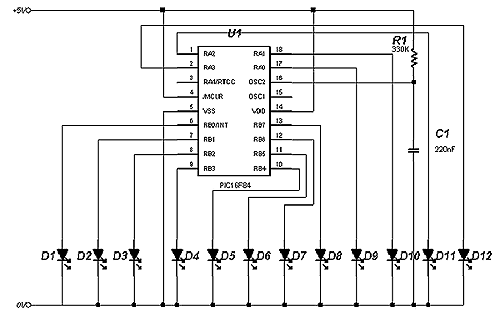
The program We have chosen is the one used in tutorial 9 where we cause a row of LEDs to light up one at a time from left to right, then right to left. The circuit is shown below, and with the RC values shown will give us a clock frequency of 8KHz. This clock speed will allow us to actually see the LEDs moving one by one. We chose this program because it is slow enough for us to play with the WDT, and you can easily see when the PIC is reset. We have removed the original comments, and We have replaced them with a description of the WDT lines, a running total of the time from the start (assuming a 8KHz clock), and the number of clock cycles at each line.
TIME equ 9FH ; Variable for the delay loop.
PORTB equ 06H ; Port B address.
TRISB equ 86H ; Port B Tristate address.
PORTA equ 05H ; Port A address.
TRISA equ 85H ; Port A Tristate address.
STATUS equ 03H ; Page select register.
COUNT1 equ 0CH ; Loop register.
COUNT2 equ
0DH
; Loop register.
bsf STATUS,5 ; 1 cycle, 0.5mS
movlw 00H ; 1 cycle, 1.0mS
movwf TRISB ; 1 cycle, 1.5mS
movlw 00H ; 1 cycle, 2.0mS
movwf TRISA ; 1 cycle, 2.5mS
bcf STATUS,5 ; 1 cycle, 3.0mS
movlw 00H ; 1 cycle, 3.5mS
movwf PORTA ; 1 cycle, 4.0mS
; Start of main program
RUN
movlw 01H ; 1 cycle, 4.5mS
movwf PORTB ; 1 cycle, 5.0mS
call DELAY ; 2 cycles, 486mS
call DELAY ; 2 cycles, 967mS
; Move the bit on Port B left, then pause.
rlf PORTB,1 ; 1 cycle, 967.5mS
call DELAY ; 2 cycles, 1.45S
call DELAY ; 2 cycles, 1.93S
rlf PORTB,1 ; 1 cycle, 1.93S
call DELAY ; 2 cycles, 2.41S
call DELAY ; 2 cycles, 2.89S
rlf PORTB,1 ; 1 cycle, 2.89S
call DELAY ; 2 cycles, 3.37S
call DELAY ; 2 cycles, 3.85S
rlf PORTB,1 ; 1 cycle, 3.85S
call DELAY ; 2 cycles, 4.34S
call DELAY ; 2 cycles, 4.82S
rlf PORTB,1 ; 1 cycle, 4.82S
call DELAY ; 2 cycles, 5.30S
call DELAY ; 2 cycles, 5.78S
rlf PORTB,1 ; 1 cycle, 5.78S
call DELAY ; 2 cycles, 6.26S
call DELAY ; 2 cycles, 6.74S
rlf PORTB,1 ; 1 cycle, 6.74S
call DELAY ; 2 cycles, 7.22S
call DELAY ; 2 cycles, 7.70S
rlf PORTB,1 ; 1 cycle, 7.70S
; Now move onto Port A, and move the bit left.
rlf PORTA,1 ; 1 cycle, 7.70S
call DELAY ; 2 cycles, 8.19S
call DELAY ; 2 cycles, 8.67S
rlf PORTA,1 ; 1 cycle, 8.67S
call DELAY ; 2 cycles, 9.15S
call DELAY ; 2 cycles, 9.63S
rlf PORTA,1 ; 1 cycle, 9.63S
call DELAY ; 2 cycles, 10.11S
call DELAY ; 2 cycles, 10.59S
rlf PORTA,1 ; 1 cycle, 10.59S
call DELAY ; 2 cycles, 11.07S
call DELAY
; 2 cycles, 11.55S
; Move the bit back on Port A
rrf PORTA,1 ; 1 cycle, 11.55S
call DELAY ; 2 cycles, 12.04S
call DELAY ; 2 cycles, 12.52S
rrf PORTA,1 ; 1 cycle, 12.52S
call DELAY ; 2 cycles, 12.99S
call DELAY ; 2 cycles, 13.48S
rrf PORTA,1 ; 1 cycle, 13.48S
call DELAY ; 2 cycles, 13.96S
call DELAY ; 2 cycles, 14.44S
rrf PORTA,1 ; 1 cycle, 14.44S
; Now move the bit back on Port B
rrf PORTB,1 ; 1 cycle, 14.44S
call DELAY ; 2 cycles, 14.92S
call DELAY ; 2 cycles, 15.40S
rrf PORTB,1 ; 1 cycle, 15.40S
call DELAY ; 2 cycles, 15.89S
call DELAY ; 2 cycles, 16.37S
rrf PORTB,1 ; 1 cycle, 16.37S
call DELAY ; 2 cycles, 16.84S
call DELAY ; 2 cycles, 17.33S
rrf PORTB,1 ; 1 cycle, 17.33S
call DELAY ; 2 cycles, 17.81S
call DELAY ; 2 cycles, 18.29S
rrf PORTB,1 ; 1 cycle, 18.29S
call DELAY ; 2 cycles, 18.77S
call DELAY ; 2 cycles, 19.25S
rrf PORTB,1 ; 1 cycle, 19.25S
call DELAY ; 2 cycles, 19.73S
call DELAY ; 2 cycles, 20.22S
rrf PORTB,1 ; 1 cycle, 20.22S
call DELAY ; 2 cycles, 20.70S
call DELAY ; 2 cycles, 21.18S
goto RUN ; 2 cycles, 21.18S
; Subroutine to give a delay between bit
movements.
;Total of 957 cycles, 480mS
DELAY
movlw TIME ; 1 cycle
movwf COUNT1 ; 1 cycle
LOOP1 ;
decfsz COUNT1 ; 9F x 1 cycle + 1 cycle = 160 cycles
goto LOOP1 ; 9E x 2 cycles = 316 cycles
movwf COUNT1 ; 1 cycle
LOOP2 ;
decfsz COUNT1 ; 9F x 1 cycle + 1 cycle = 256 cycles
goto LOOP2 ; 9E x 2 cycles = 316 cycles
return ; 2 cycles
END ;
With an 8KHz clock, it takes just under 1 second for the next LED illuminates, and it takes a total of about 21 seconds to run from one end to the other and back again i.e. to go through the routine once only. The delay routine takes 480mS, and we are calling it twice before moving the bit on the ports. Now, we need to periodically reset the WDT. The largest time we can set the WDT is 2.3 seconds, and the next one down form this is 1.1 seconds. We have two options here. We could make a call to a subroutine to clear the WDT after the two delays have finished, or we could incorporate the CLRWDT within the delay itself. We have decided, for no real reason at all, to incorporate the CLRWDT within the delay loop.
TIME equ 9FH ; Variable for the delay loop.
PORTB equ 06H ; Port B address.
TRISB equ 86H ; Port B Tristate address.
PORTA equ 05H ; Port A address.
TRISA equ 85H ; Port A Tristate address.
STATUS equ 03H ; Page select register.
COUNT1 equ 0CH ; Loop register.
COUNT2 equ 0DH ; Loop register.
OPT equ 81h ; Option Register to control the WDT
;*************Set up the ports, WDT and prescaler****************** clrf 01h ;Clear TMR0
bsf STATUS,5 ;Switch to bank 1
clrwdt ;reset the WDT and prescaler
movlw b’1101’ ;Select the new prescaler value and assign
movwf OPT ;it to WDT
movlw 00H ; Now set up the ports
movwf TRISB ;
movlw 00H ;
movwf TRISA ;
bcf STATUS,5 ;Come back to bank 0
movlw 00H ;
movwf PORTA ;
;*************Start of main
program***************************** RUN
movlw 01H
;
movwf PORTB ;
call DELAY ;
call DELAY ;
; *************Move the bit on Port B left, then pause.**************
rlf PORTB,1 ;
call DELAY ;
call DELAY ;
rlf PORTB,1 ;
call DELAY ;
call DELAY ;
rlf PORTB,1 ;
call DELAY ;
call DELAY ;
rlf PORTB,1 ;
call DELAY ;
call DELAY ;
rlf PORTB,1 ;
call DELAY ;
call DELAY ;
rlf PORTB,1 ;
call DELAY ;
call DELAY ;
rlf PORTB,1 ;
call DELAY ;
call DELAY ;
rlf
PORTB,1
;
; *************Now move onto Port A, and move the bit left.***********
rlf PORTA,1 ;
call DELAY ;
call DELAY ;
rlf PORTA,1 ;
call DELAY ;
call DELAY ;
rlf PORTA,1 ;
call DELAY ;
call DELAY ;
rlf PORTA,1 ;
call DELAY ;
call DELAY ;
;************** Move the bit back on Port A************************
rrf PORTA,1 ;
call DELAY ;
call DELAY ;
rrf PORTA,1 ;
call DELAY ;
call DELAY ;
rrf PORTA,1 ;
call DELAY ;
call DELAY ;
rrf PORTA,1 ;
;****************** Now move the bit back on Port B******************
rrf PORTB,1 ;
call DELAY ;
call DELAY ;
rrf PORTB,1 ;
call DELAY ;
call DELAY ;
rrf PORTB,1 ;
call DELAY ;
call DELAY ;
rrf PORTB,1 ;
call DELAY ;
call DELAY ;
rrf PORTB,1 ;
call DELAY ;
call DELAY ;
rrf PORTB,1 ;
call DELAY ;
call DELAY ;
rrf PORTB,1 ;
call DELAY ;
call DELAY ;
goto RUN ; ; ******************Subroutine to give a delay between bit movements.******
DELAY
movlw TIME ;
movwf COUNT1 ;
LOOP1
;
decfsz COUNT1 ;
goto LOOP1 ;
movwf COUNT1 ;
LOOP2 ;
decfsz COUNT1 ;
goto LOOP2
;;;;;;;;;;;;;;;;;;;;;;;;;;;;;;;;;;;;;;;;;;;;;;;;;;;;;;;;;;;;;;;;;;;;;;;;;;;;;;;;;;;;;;;;;;
;; This part resets the WDT ;;
;;Comment out or remove this command to see the WDT ;;
;; in action. It should reset the PIC ;;
;;;;;;;;;;;;;;;;;;;;;;;;;;;;;;;;;;;;;;;;;;;;;;;;;;;;;;;;;;;;;;;;;;;;;;;;;;;;;;;;;;;;;;;;;;;;;
clrwdt ;This simply resets the WDT.
;***************Return from our original DELAY routine***************
return
;
END ;
If you comment out, or remove the CLRWDT command, you will find that the PIC will not go past lighting the second LED. This is because the WDT is resetting the PIC. With the CLRWDT
in place, the program works as it should.
|